





Magic Tiles 3™ - Piano Game review
 Analysis by GetAllApps
I find Magic Tiles 3™ easiest to understand as a quick rhythm game, not a piano lesson. You follow a song by tapping the dark tiles as they arrive, trying to keep your timing steady and avoid a missed note. The idea is simple enough to grasp in a moment, but faster passages can demand real concentration. If you want a musical game that is ready for short sessions and rewards practice, it is an inviting place to start.
What to expect from the rhythm
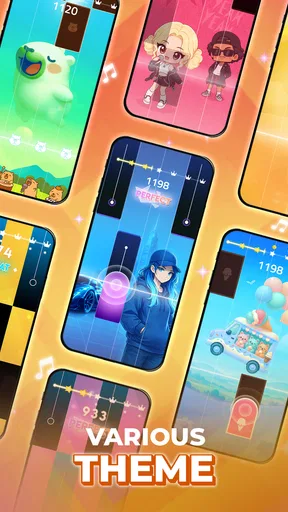
This is a music game built around visual timing: listen to the track, watch the tiles, and tap in rhythm. The satisfaction comes from getting into a reliable flow, especially when a sequence that first seemed too quick starts to feel manageable. I would not treat it as a substitute for learning piano technique. It is better understood as an accessible test of attention, reaction, and rhythm.
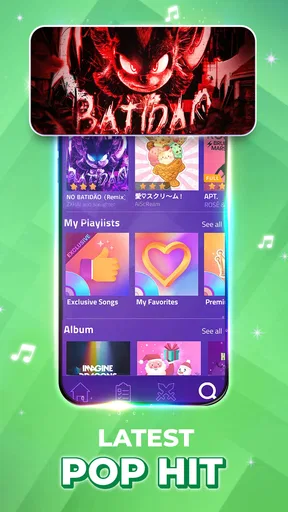
The song selection gives the game a broad pop-facing appeal, with K-pop among the styles highlighted, alongside seasonal music and challenging pieces such as Rush E. That variety helps the central mechanic feel less repetitive, although the experience still revolves around the same basic action. A familiar tune can make a run more enjoyable, but knowing a song does not automatically make its tile pattern easy.
It is developed by AMANOTES PTE. LTD. and is listed as a free music game. The game has a 4.6 average from around 3.6 million ratings, and it has passed 500 million installs. Those figures suggest a very large audience, but the practical question is whether this particular style suits you: if you enjoy chasing cleaner timing and improving through retries, it has an obvious draw.
Who will enjoy it—and who may not
I would recommend it to someone who wants an easy game to pick up while waiting for a ride, taking a short break, or relaxing at home with headphones. It can also suit friends or family members looking for a simple challenge to try in turns, provided everyone is comfortable with fast tapping. The age rating is Everyone 10+, so it is worth checking that guidance when choosing a game for a younger player.
It is less suitable if you want a calm background activity. Even though the controls are uncomplicated, demanding sections require your eyes and hands to stay engaged. It is also not the right choice if you expect a realistic keyboard, note-reading practice, or instruction in music theory. A piano-learning app or a slower, more forgiving rhythm game would be a better fit for those goals.
Getting started without overthinking it
After installing, I would begin with a song that feels approachable rather than immediately choosing the most intimidating challenge. The first useful goal is simply to finish a run while keeping your attention on the incoming tiles. Resist the urge to tap ahead because you recognize the melody: the game asks you to respond to the pattern on screen, and anticipation can throw off your timing.
For a more comfortable first attempt, hold the device securely and use a light touch. You do not need to pound the screen; forceful tapping can make it harder to stay relaxed and consistent. If you play with sound, keep the volume at a level where the beat is clear without being uncomfortable. The visual rhythm remains important, so treat the music as support rather than relying on listening alone.
A small but useful adjustment is to focus on the next tile rather than staring at the one you are about to tap. That gives your hands a moment to prepare, especially when the pattern becomes denser. I also find it helpful to keep my taps compact and use the same finger placement throughout a run. These habits are more useful than trying to move faster by making bigger gestures.
Your first meaningful success
For a new player, success does not have to mean clearing the hardest track. A more realistic milestone is completing an easier song with fewer interruptions than on the first try. If a run ends early, remember the section that caused trouble and restart with a calmer pace. Repeating a short passage mentally can make the next attempt feel less surprising, even though the game is still asking you to react in real time.
One practical routine is to play the same song twice before switching. On the first run, learn where the rhythm changes; on the second, concentrate on keeping your taps even through that change. This is a better test of improvement than bouncing between unrelated tracks after every mistake. It also helps you tell whether a difficulty came from the song’s pace, your attention drifting, or simply unfamiliarity with the pattern.
Do not judge your ability from a single difficult attempt. Fast sequences can create a chain reaction: one missed tap distracts you, and then the next few arrive before you have recovered. If that happens, pause briefly and reset your focus rather than tapping more aggressively. The game is most satisfying when you treat a failed run as feedback, not as proof that you lack rhythm.
Common points of confusion
The biggest misconception is that the melody alone tells you exactly what to tap. Familiarity can help you anticipate the feel of a song, but the tile stream is what you need to follow. Another is assuming that a missed note can be corrected by tapping rapidly afterward. In practice, rushing tends to create more mistakes; returning to the current visual beat is usually the more sensible response.
Players may also wonder whether the game is genuinely offline. Offline music play is part of its appeal, making it a candidate for a commute or a place with an unreliable connection. I would still prepare before leaving: open the game and make sure the content you intend to play is available on your device. That simple check avoids discovering a connection-related inconvenience when you are already away from reliable service.
There is a difference between the free download and the full range of possible spending. The game is free to start, while in-app purchases are listed from $0.99 to $49.99 per item. If you are installing it for a child or prefer to keep spending controlled, review your device’s purchase settings before handing over the phone. You can enjoy the basic rhythm-game idea without treating optional purchases as necessary to your first session.
How it compares with other music games
Compared with a conventional piano app, Magic Tiles 3 is much more immediate: there is no need to begin by learning a keyboard layout or reading notation. That makes it easier to share casually and quicker to understand. The trade-off is that the skill you build is closely tied to following its tile patterns. It may sharpen timing and visual attention, but it does not offer the same kind of structured musical instruction as a teaching-focused app.
Against other tap-based rhythm games, its appeal is the direct connection between songs and a familiar falling-tile format. That clarity is also a limitation. If you want deep customization, a strong sense of progression through musical skills, or a completely different control style, another game may hold your interest longer. I would choose this one for quick, song-led challenges rather than for a long, varied campaign.
The current version is 13.084.006, and the stated minimum operating system is version 7.0. If your device meets that requirement, the main decision is not technical so much as personal: do you enjoy reacting to a steady stream of visual cues? The game is rated Everyone 10+, and its large audience makes it easy to find, but neither popularity nor a high average rating guarantees that its pace will suit every player.
Building a better second session
Once the first run feels comfortable, make your next session purposeful. Choose one song and work on staying composed through the section where you usually lose the rhythm. If the timing feels off, try lowering distractions around you rather than changing everything at once. A quiet setting and a stable grip can make it easier to distinguish a genuine timing problem from a moment when your attention simply wandered.
For a short everyday break, I would set a modest goal before opening the game: finish one track, improve a troublesome passage, or try a different style of song. That keeps a quick session satisfying without turning every attempt into a score chase. If you are playing with someone else, taking turns can make the challenge more social, though the faster patterns may be frustrating for a beginner who has not yet settled into the controls.
My recommendation
I think Magic Tiles 3 works best when you approach it as a compact rhythm challenge with a gentle learning curve at the start and a sharper test of focus as you move into harder material. Its strongest quality is how quickly a new player can understand what to do; its main weakness is that the core interaction stays familiar, so it may lose appeal if you want substantial variety in how you play.
Give it a try if you like tapping along to music, want something that fits into spare minutes, or enjoy improving through repeated attempts. Start with a manageable song, keep your movements light, and judge progress by steadier timing rather than by the hardest challenge available. If you are looking for piano lessons, a quiet game, or a rhythm experience built around more elaborate controls, I would point you elsewhere. For a first-time player who wants a quick route from installation to a small, satisfying win, this is an approachable option.
Pros and cons
Pros
- Quick rounds make it easy to play during short breaks.
- A wide range of songs keeps the music selection varied.
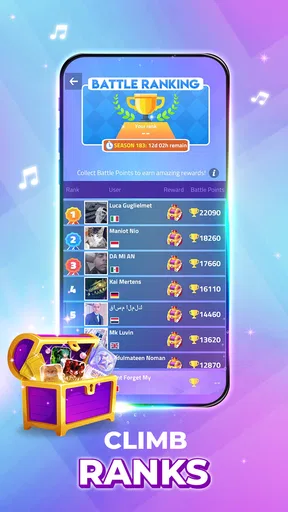
- Online modes let you compete against other players.
- Simple tap controls are easy for newcomers to learn.
- New songs and events provide fresh goals over time.
Cons
- Fast sections can feel demanding for beginners.
- Some songs and features require in-app purchases.
- Ads may interrupt play between sessions.
- Online play depends on a stable internet connection.
- Accidental taps can end a run and reduce your score.


